How I find and write net new blog opportunities
Guides By Stefan Maritz6 min read

A single run of this process can surface 100 blog posts my site should have and doesn't. I keep the strongest few, cut the rest, and have drafts back in the same session.
The list comes from data I already own, plus a bit I rent, pulled into one working session with an LLM that can see all of it at once. I run the exact same setup for my own brand and at Backbase, and the process barely changes between a brand-new site and an established one.
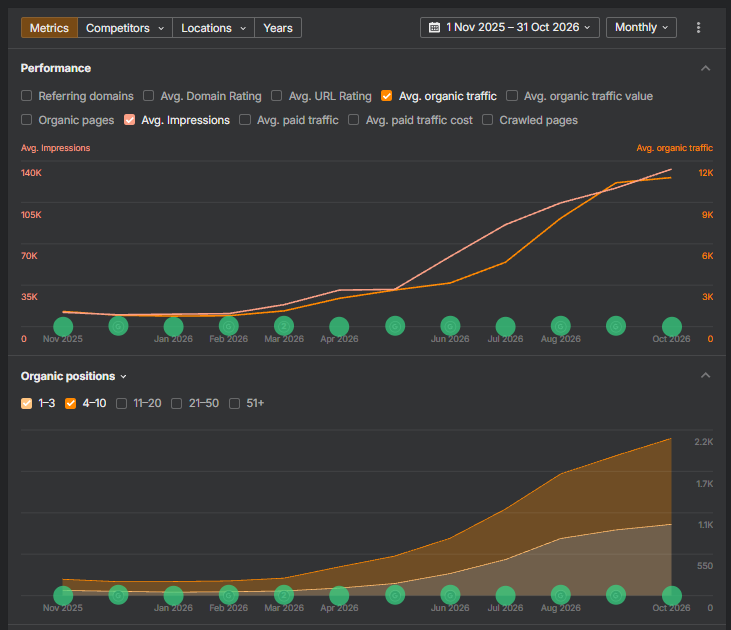
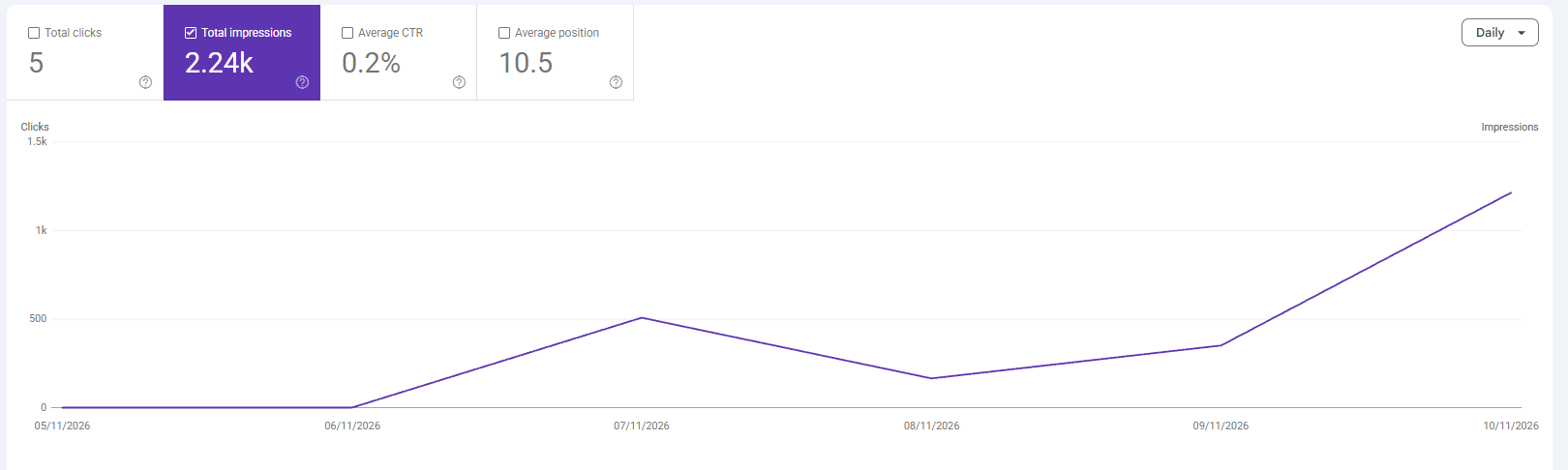
Before I even start, here's what this strategy looks like on graphs
Big brand, high authority:

New brand, launched a few months ago:

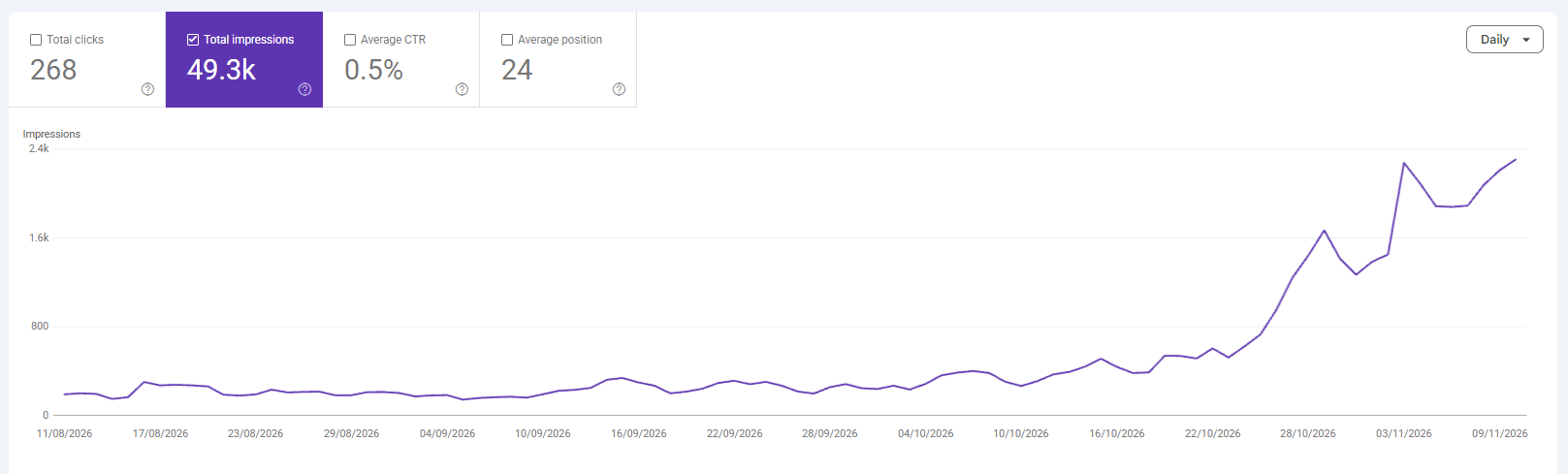
*Clicks on this one here are still low, but I am getting organic leads from Google, LLMs, and I have people emailing me daily asking for link exchanges. So it has exposure and it's picking up speed.
And just for absolute experimental purposes. Here's a site I launched a week ago for this newsletter that has skyrocketed to over a thousand impressions a day.
What I mean by net new
A net new blog opportunity is a keyword or question your site should own but has no dedicated page for. Sometimes you already show up for it in search, ranking somewhere deep with a post that mentions it in passing. Sometimes nobody on your site has touched it yet, but it sits squarely inside a cluster you're building.
It's the most reliable workflow in my whole content operation. If Google already associates you with a query and you give it a page built for that query, you hand it more to work with than whoever else is ranking. Young sites have plenty of these lying around. Established sites have them too, mostly sitting in Search Console as queries that land on the wrong page.
The five data sources
Google Search Console shows the queries I already earn impressions for. The cheapest wins live here, queries with impressions and weak positions where the ranking page clearly wasn't written for that query.
Google Analytics tells me which pages people engage with. A cluster where readers stick around is a cluster worth extending, and a page with traffic but no engagement usually means I answered the wrong question.
Search volume from Google's official API tells me whether anyone is searching at all. An idea with zero volume can still be worth writing, but I want to know that's the call I'm making.
SerpApi gives me the live results page for any keyword, who ranks, what they wrote, and what the AI overview says. I pull the AI overview three times per keyword because it shifts between runs, and three pulls show me what's stable and what's missing that I can bring to the table.
LLM visibility data shows whether AI assistants mention the brand when people ask questions in the cluster. A topic where competitors get cited and we don't is a strong candidate, even when the search volume looks modest.
Step one: scope the session to a cluster
I never ask for "blog ideas". I name a cluster. Right now I'm building one around MCP servers, the best MCPs for content marketing, for SEO, for social media, and so on. Scoping it like this keeps the results relevant and stops the model wandering off into everything the site could theoretically rank for.
Step two: check what already exists
Before it looks at a single keyword, the model reads what the site already has. This is how you avoid cannibalisation, where you publish a second post on a topic and the two pages split the rankings between them. If a post already covers the query, it goes on the update list instead to keep things fresh and last update dates recent.
Step three: pull the data and generate candidates
Then it works through the sources: keyword ideas around the cluster, Search Console queries, search volumes, and visibility data, all checked against the brand's knowledge base so it knows what we sell and who we write for. Expect a long list. Every run comes back a little different, which is fine, the strong ones keeps showing up.
Step four: filter with judgement
This is the part I won't hand over. Plenty of what comes back is technically valid and strategically useless. A keyword like "LinkedIn MCP" might have volume, but if it connects to nothing I want to be known for, it gets cut.
A keyword like "meeting transcript MCP" goes straight to the top. It has search volume, and it sits right on top of something I say constantly: your transcripts are the most valuable content asset you own. When a keyword with demand lines up with a point of view you already hold, write that one first.
Step five: brief it with something only you have
Once I've picked, I give a short brief or even a domain expert point of view in the form of a voice memo. If you have a transcript from a recent podcast or webinar, it also works well. If you have proprietary data, even better. The model writes from your words and uses the research as backup.
This also lets you split the work across the week. On Monday you run the research and save the shortlist as a note. You ask the people on your team who know each topic for a voice memo, a transcript, or their meeting notes. When those land, you go back and write.
Step six: research the angle
Then the research runs. It pulls the top-ranking posts, runs the AI overview three times, looks at the angles competitors take and how they write, and sets all of it against the brief and the knowledge base to find the angle only your brand can write.
Step seven: write with a playbook
The writing runs on a playbook, the big brief that sets the structure, word count, how to handle backlinks, and the internal linking rules. This is different for every brand and every blog type. A listicle has a different framework from an editorial blog.
You can build playbooks the other way round too. Find a few posts from a company whose content you rate, hand them to the model, and ask it to turn them into a playbook.
Step eight: edit, then publish
The draft comes back and I read it properly before it goes anywhere. Links are the first thing I check, models tend to over-link, and a paragraph propped up by citations reads like a bibliography. After that I read for voice and accuracy. Small fixes happen in the conversation, bigger ones in the editor, and once I'm happy it publishes straight to the site.
Turn it into a skill, then a schedule
After a few runs the prompt settles, and that's when it should become a reusable skill so you stop retyping it. Then put it on a schedule. Monday morning, the research runs and the shortlist is waiting for you.
My own setup goes further. An automation runs three days a week. It finds net new opportunities, writes two new posts, updates three existing ones based on what's performing and what isn't, and it's allowed to build one landing page when a cluster gets big enough to need a hub that ties the interlinking together. It doesn't always use that allowance.
The site has become a living thing that builds itself. I set the rules and check the output, and I step in when something needs judgement.
Where it all comes together
For me all of this runs through Contengi's MCP on Claude, using scheduled chats. Contengi holds the knowledge base, playbooks, and transcripts, plus the connections to Search Console, Google Analytics, search volume, SerpApi, and LLM visibility, so Claude can reach all of it in one session. The session that finds the opportunity is the same one that reads the brand, writes the post, and publishes it, and it sits alongside whatever other skills and tools you already run in Claude.
More insights
Claude Code vs Codex for marketing teams in 2026: a docs-based comparison
Claude Code and Codex both edit a repository, run commands, and open pull requests. This comparison, built from each tool's docs, shows where they differ for a marketing team and how to keep your rules portable.
Reviews · 7 min
Claude Cowork vs Claude Code for marketers: which one to use in 2026
Claude Cowork and Claude Code share one agent engine and do different jobs. This docs-based comparison shows which one a marketing team should open for reports, decks, websites, and scheduled work.
Reviews · 7 min
Best AI website builder for marketing sites in 2026
Wix, Framer, Webflow, Lovable, v0, and Claude Code compared on what a marketing team keeps after launch: code, SEO output, and agent editing. Built from each tool's own docs.
AI-native websites · 7 min